
Town Tech · Call or text 863-288-0123 · 217 Main Street, Auburndale, FL 33823
How to start a scan with Norton shortcut
Simple steps with a picture: how to start a scan with Norton from the desktop shortcut.
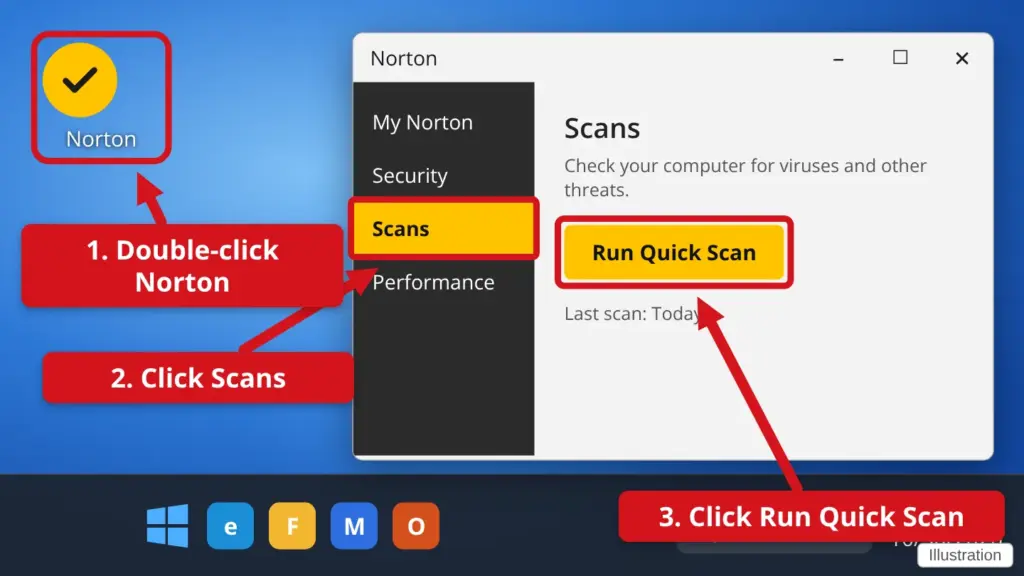
- Find the yellow Norton icon on your desktop and double-click it. Double-click means two quick clicks.
- In the Norton window, click Scans. Norton looks a little different on each computer. If you do not see Scans, click Security first.
- Click Run Quick Scan. A bar shows how far along it is. Leave the computer on until it says it is done.
- Read the result. If Norton says it found something, click the button it offers to fix it. If you are unsure, call us.
A Quick Scan only takes a few minutes. It is fine to keep using the computer while it runs.
Stuck? Call or text Town Tech at 863-288-0123. We are happy to help.
Find this guide online: townlearn.com/how-to-start-a-scan-with-norton-shortcut/
Still stuck? Call or text Town Tech: 863-288-0123 (Tue–Fri, 10 AM–4 PM)
Still stuck? Call or text Town Tech: 863-288-0123 (Tue–Fri, 10 AM–4 PM)